


It's 6:40 on a Thursday night. A couple who live twelve minutes from your hotel are standing in their kitchen, trying to decide where to eat. One of them types "date night restaurant near me" into her phone. Your chef's tasting menu is the best answer within five miles. Google shows her three other places.
Not because your food is worse. Because as far as Google is concerned, your restaurant barely exists. It lives on a page called "Amenities," shares a phone number with the front desk, and every glowing review about the short rib is sitting on a listing categorized as "Hotel."
This is one of the most common, and most expensive, blind spots we see at full-service independent properties. A hotel with a restaurant, a bar, and a spa is really four businesses under one roof. Each has its own customers, its own search behavior, and its own competitors. Market them as one, and you quietly hand three of those businesses' local search visibility to whoever is down the street.
The fix isn't complicated, but it does require you to stop thinking like a hotel and start thinking like a portfolio. Here's how we approach it, piece by piece.
Travelers and Locals Don't Search the Same Way
A traveler planning a trip to Charleston searches for a place to sleep. "Boutique hotel downtown Charleston." "Hotel with rooftop pool near King Street." They're usually searching weeks out, comparing options, and often landing in Google's hotel results alongside the OTAs.
A local searches for an experience, right now. "Best old fashioned near me." "Couples massage this weekend." "Brunch with outdoor seating." They're searching from their phone, often within a few miles of you, and they're looking at the map pack, those three listings Google pins at the top of local results.
Those are two completely different queries, two different results pages, and two different sets of competitors. Your hotel competes with the Marriott and the inn across town. Your restaurant competes with every independent bistro in the neighborhood. Your spa competes with the day spa in the strip mall that has 640 reviews and a very active owner.
Here's the part that stings: a single hotel listing can't win both fights. Google matches local results largely on relevance, distance, and prominence, and relevance starts with your business category. A listing categorized as "Hotel" simply isn't a strong candidate for "cocktail bar near me," no matter how good your bartender is.
For most full-service independents, food and beverage and spa revenue depend heavily on non-staying guests. Locals fill the restaurant on a Tuesday in February when occupancy is 52%. They book spa days that keep therapists busy midweek. If those outlets are invisible in local search, you're relying on in-house guests and walk-by traffic to carry three businesses. That's a lot of weight to put on a lobby sign.
If you want a refresher on how the hotel side of local search works, including how Google's hotel results factor in, our guide to local SEO for hotels covers the foundation. This post is about everything that sits on top of it.
Give Each Outlet Its Own Google Business Profile
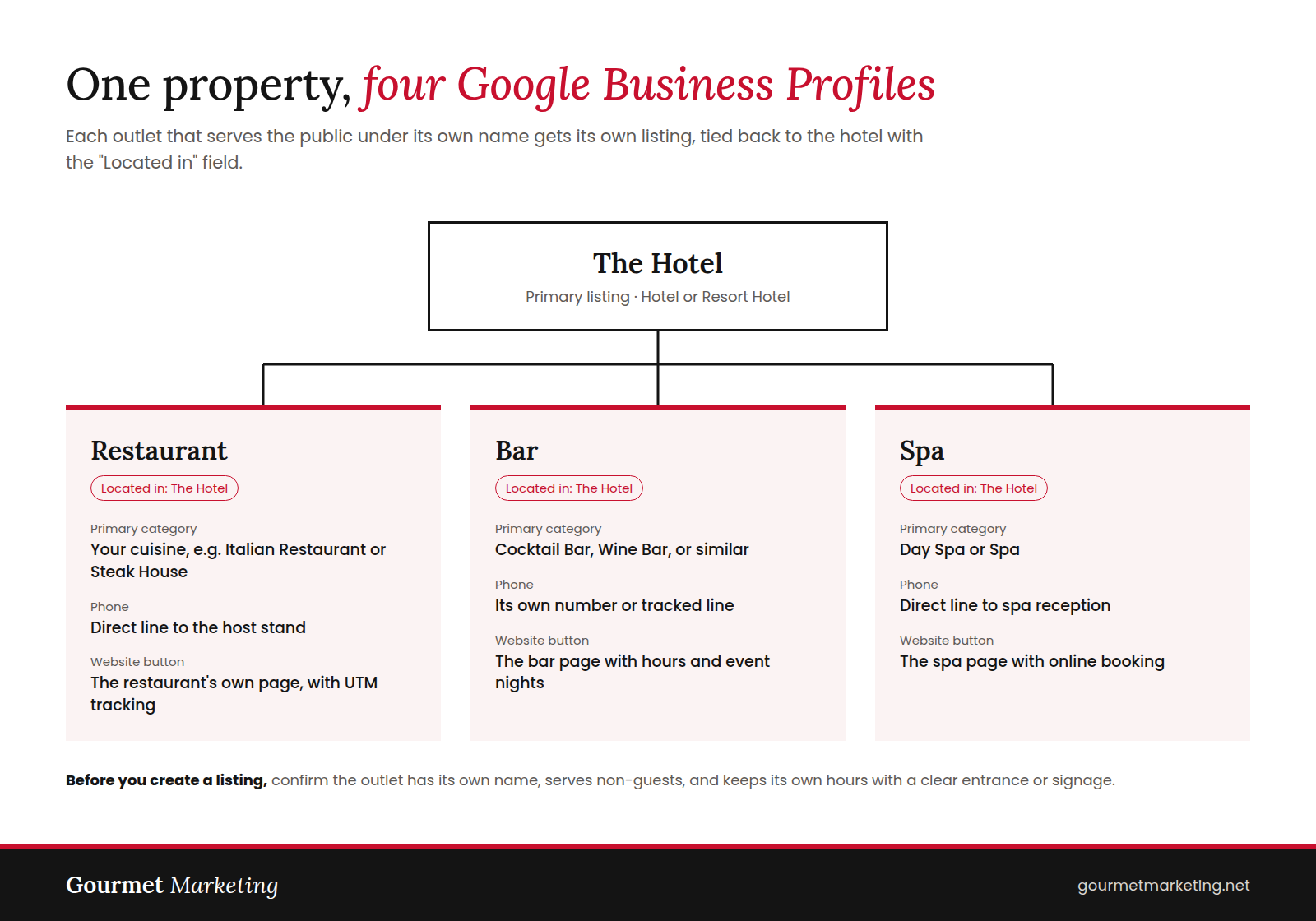
Google's own guidelines allow businesses that operate inside a hotel, like a restaurant or a spa, to have their own Google Business Profile. That's your green light. One primary listing for the hotel, then a separate listing for each outlet that genuinely operates as its own business.
That last part matters. Before you create a profile, ask three questions. Does the outlet have its own name or brand? Does it serve the public, not just hotel guests? Does it have its own hours and a clear way in, whether that's a street entrance or obvious signage from the lobby? If your "bar" is a lobby counter that pours wine for guests from 5 to 9, it probably doesn't need a listing. If it's a named rooftop bar that locals line up for on Saturdays, it absolutely does.
Once you've confirmed which outlets qualify, set each one up properly:
- Choose precise categories. Your primary category is the single biggest relevance signal you control. The hotel might be "Hotel" or "Resort Hotel." The restaurant should be its cuisine or style, like "Italian Restaurant" or "Steak House." The bar might be "Cocktail Bar" or "Wine Bar." The spa should be "Day Spa" or "Spa." Add relevant secondary categories, but don't stuff them.
- Use the "Located in" field. Connect each outlet's listing to the parent hotel. This tells Google the shared address is intentional, not a duplicate, and it helps the listings reinforce each other.
- Give each outlet its own phone number. A direct line or a tracked number that rings the restaurant host stand, not the front desk. It's better for the guest and cleaner for tracking.
- Point the website button to the outlet's own page. Not the hotel homepage. A local who taps "Website" on your spa listing should land on the spa, with a booking button above the fold. Add UTM parameters so you can see in GA4 exactly how much traffic and how many reservations each listing drives.
- Fill out everything. Hours (including seasonal and holiday hours), reservation links, menu links, attributes like "outdoor seating" or "happy hour," and a steady stream of real photos. A restaurant listing with 14 photos from 2021 looks closed.
One practical note: assign an owner for each listing. In our experience, the outlet listings that perform best are the ones a specific person checks every week, usually the outlet manager with support from marketing. Listings that belong to everyone end up belonging to no one.
Build Real Landing Pages, Not an Amenities Paragraph
A Google Business Profile can only rank as well as the page behind it. If your restaurant listing points to a single "Dining" page with three paragraphs and a PDF, you've done half the work.
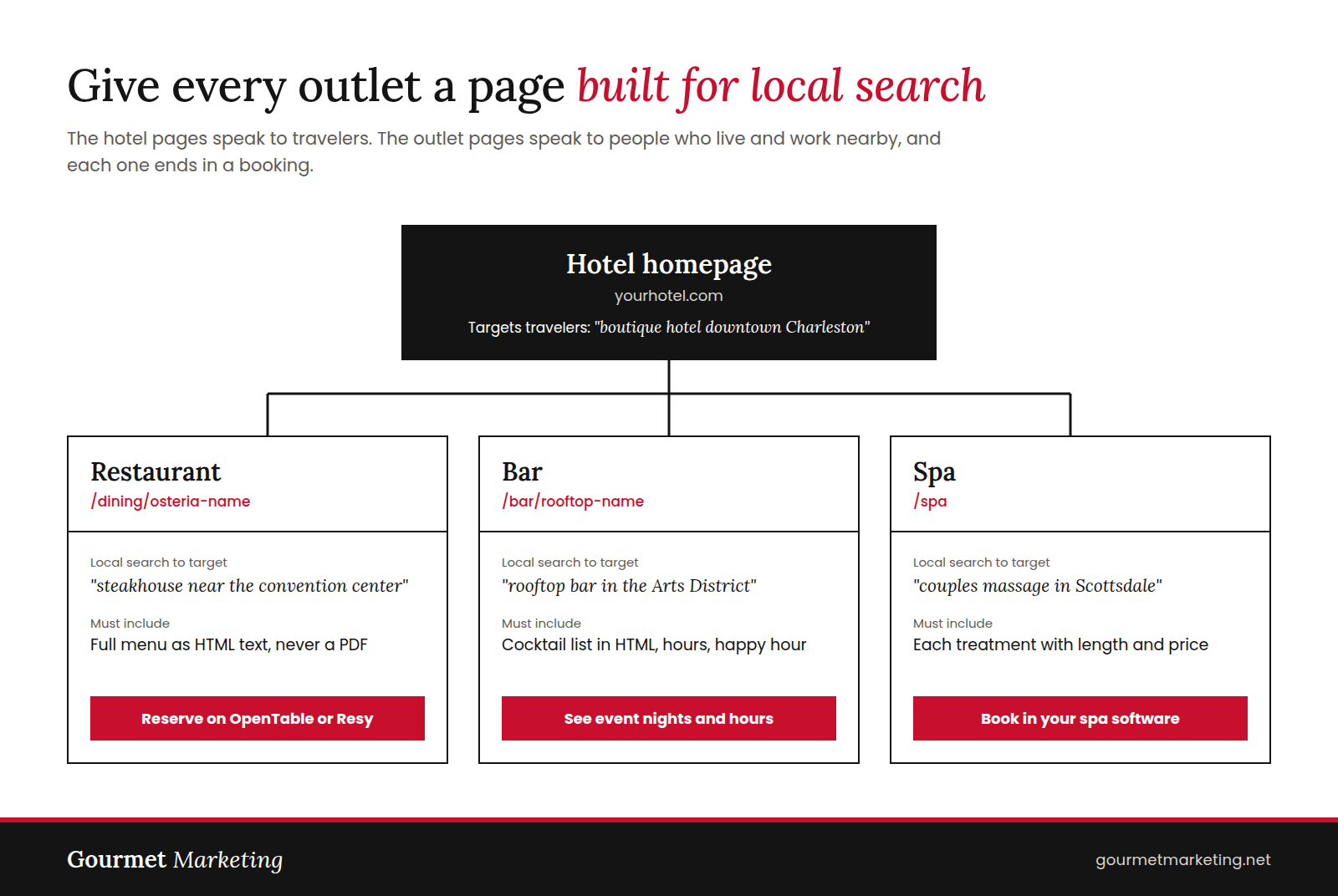
Each outlet needs its own dedicated page, structured as a section of the hotel site. Something like:
Keeping these on the hotel domain is usually the right call for independent properties. Your hotel site has years of authority, and the outlet pages benefit from it. A separate restaurant domain can make sense for a heavily branded, chef-driven concept, but it means building authority from scratch. Decide deliberately, not by accident.
What goes on these pages is just as important as where they live.
Write for local intent. The hotel pages target travelers. The outlet pages target the people who live and work nearby. That means phrases like "rooftop bar in the Arts District," "steakhouse near the convention center," or "couples massage in Scottsdale." Mention the neighborhood, nearby landmarks, parking, and whether non-guests are welcome. You'd be surprised how many locals assume a hotel restaurant is for guests only.
Put menus in HTML. This one is non-negotiable. PDF menus are hard for search engines to read and miserable on a phone. When your menu lives on the page as real text, you give Google a reason to show your restaurant for "wood-fired octopus" or "mezcal cocktails." Every dish name is a potential search query. The same logic applies to the spa: list each treatment with a short description, duration, and price.
Make the next step obvious. The restaurant page should have a reservation button tied to OpenTable, Resy, or SevenRooms. The spa page should link straight into your spa booking software. The bar page should show hours, happy hour details, and event nights. If a local has to hunt for how to book, they'll book somewhere else.
Connect the outlets to each other. Link the spa page to your spa-and-stay package. Link the restaurant page to your anniversary package. These internal links help search engines understand how your offerings relate, and they quietly turn a dinner guest into a future overnight guest. That kind of topical connection is a big part of semantic SEO for hotels, and it works especially well for full-service properties with a lot to talk about.
Use Schema Markup to Show How It All Connects
Structured data is the part of this strategy guests never see, and it's the part most hotel websites skip. Schema markup is code that tells search engines, in plain terms, what each page is about and how the pieces relate. With AI Overviews and AI travel assistants pulling more and more answers straight from structured information, this is no longer a nice-to-have.
The idea is simple. Each page gets the schema type that matches the business it describes:
- Hotel homepage: Hotel schema, with a unique @id and a containsPlace property listing the outlets.
- Restaurant page: Restaurant schema, with servesCuisine, hasMenu, acceptsReservations, and a containedInPlace property pointing back to the hotel's @id.
- Bar page: BarOrPub schema, linked to the hotel the same way.
- Spa page: DaySpa schema, with hours, treatments, and the same link back to the hotel.
Here's a simplified example of what the restaurant markup looks like:
{
"@context": "https://schema.org",
"@type": "Restaurant",
"name": "Osteria Name",
"servesCuisine": "Italian",
"acceptsReservations": "True",
"telephone": "+1-555-555-0142",
"containedInPlace": {
"@type": "Hotel",
"@id": "https://yourhotel.com/#hotel"
}
}
The @id is what ties everything together. It works like a name tag that every page agrees on, so Google understands that the restaurant, the bar, and the spa all belong to the same hotel. Make sure the name, address, and phone number in your schema match the corresponding Google Business Profile exactly. Then run every page through Google's Rich Results Test before you call it done.
Send Reviews to the Right Listing
Reviews are one of the strongest prominence signals in local search, and full-service hotels waste more of them than anyone.
Think about it. A local couple has a spectacular anniversary dinner. They search your property's name to leave a review, the hotel listing comes up first, and they leave five stars there. It's lovely for the hotel. It does nothing for the restaurant's ranking in the local map pack, which is where that review would have earned its keep.
The solution is to make the right listing the easiest one to find:
- Put outlet-specific QR codes in front of guests. On restaurant and bar check presenters, on a small card at the host stand, and on the spa checkout counter. Each code goes directly to that outlet's Google review form, not the hotel's.
- Automate spa follow-ups. Set your spa booking software to send a short text or email about two hours after the treatment ends. The guest is relaxed, the experience is fresh, and one tap takes them to the spa's review page.
- Keep the hotel review flow for staying guests. Post-stay emails and front desk asks should continue pointing to the hotel listing. That's where those reviews belong.
- Ask about the experience, not the keywords. A simple prompt like "Tell us what you ordered" or "Which treatment did you have?" naturally produces reviews that mention the ribeye or the deep tissue massage. Those details help your relevance. Don't script reviews, and never offer discounts or freebies in exchange for them. Google's policies prohibit incentivized reviews, and it isn't worth the risk.
Finally, let the outlet managers respond to their own reviews. A reply from the chef or spa director reads very differently than a templated note from "Guest Relations." Respond to everything within 48 hours, including the three-star reviews. Especially the three-star reviews.
Build a Separate Citation Footprint for Each Outlet
Citations are mentions of your business name, address, and phone number on other sites. Search engines use them to confirm that a business is real and that its details are accurate. Consistency matters for each outlet, and so does showing up where that outlet's customers actually look.
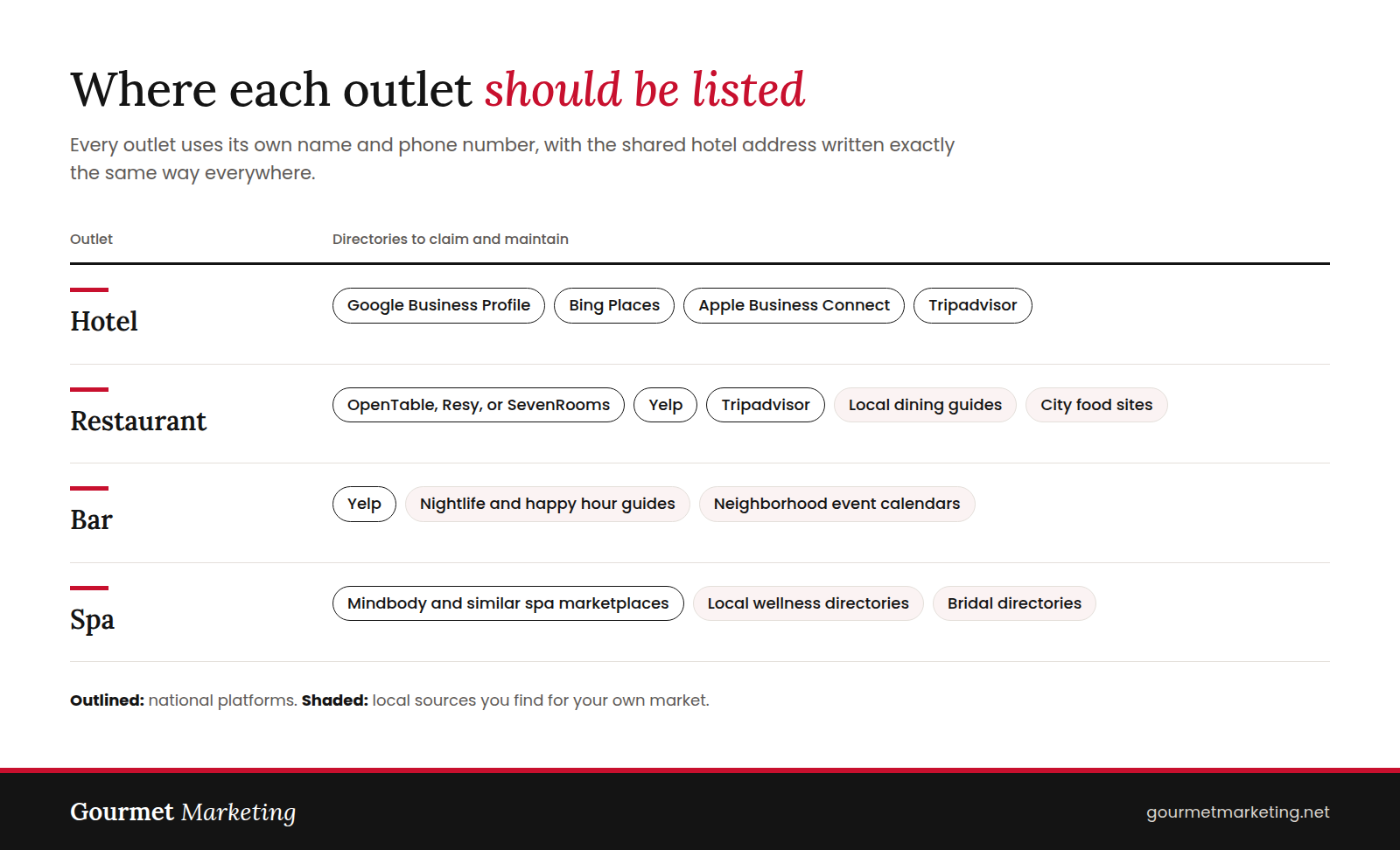
Each outlet's citations should use its own name and its own phone number, with the shared hotel address written exactly the same way everywhere. "Suite 100" on one site and "Ste. 100" on another is the kind of small inconsistency that adds up.
Citations get you on the map. Local links help you climb it. A feature from the city's food writer, a spot on a "best rooftop bars" roundup, or a mention from the local wedding planner all build authority for the outlet and the hotel together. We've written about how local link building improves hotel category rankings, and the same principles apply to every outlet under your roof.
Start With a 30-Minute Audit
You don't need to rebuild everything this week. You need to know where you stand. Block 30 minutes, grab your phone, and run these checks from a location a few miles from your property:
- Search "[your cuisine] restaurant near me," "cocktail bar near me," and "day spa near me." Do your outlets appear in the map pack? Do they appear at all?
- Search each outlet by name. Does it have its own Google Business Profile, or does the hotel listing come up instead?
- Open your restaurant and bar pages. Is the menu real text or a PDF?
- Count your restaurant and spa reviews on Google. Then count how many of your hotel reviews actually talk about dinner or a massage. That second number is the visibility you've been giving away.
Most full-service independents we audit find at least two of those four checks come back red. The good news is that every one of them is fixable, and the payoff compounds. More local diners in the restaurant. More midweek spa bookings. More locals who fall for your property over a cocktail and come back for a staycation.
Frequently Asked Questions
Can a hotel restaurant have its own Google Business Profile?
Yes. Google allows businesses that operate inside a hotel, such as a restaurant, bar, or spa, to have their own profile. The outlet should have its own name, serve the public, and keep its own hours. Use the "Located in" field to connect it to the hotel listing.
Won't multiple listings at the same address look like duplicates?
Not if they're set up correctly. Each listing needs a distinct name, its own category, its own phone number, and a website button pointing to its own page. Linking each outlet to the hotel with the "Located in" field tells Google the shared address is intentional.
Should the restaurant have its own website or live on the hotel site?
For most independent hotels, a dedicated section of the hotel site is the better choice. The outlet pages benefit from the authority your hotel domain has already built. A separate domain can make sense for a heavily branded, chef-driven concept, but you'll be starting from zero.
Why do PDF menus hurt local SEO?
Search engines struggle to read PDFs, and they're frustrating to use on a phone. When your menu is published as real text on the page, every dish and cocktail becomes something Google can match to a search like "wood-fired pizza near me."
How do we get reviews on the outlet listings instead of the hotel listing?
Make the right listing the easiest one to reach. Put outlet-specific QR codes on check presenters and at the spa desk, and send spa guests a review link a couple of hours after their treatment. Keep post-stay emails pointed at the hotel listing. Never offer incentives for reviews, since Google's policies prohibit them.
How long does it take to see results?
Basic fixes, like correct categories and complete profiles, can improve visibility within a few weeks. Rankings built on reviews, citations, and local links take longer, usually several months of steady work. The properties that win are the ones that treat each outlet's listing as an ongoing responsibility, not a one-time setup.